Tools on this page link to their official sites. No link here earns this site anything.
No tool paid for placement or review wording, and no figure on this page was supplied by a vendor. Earnings ranges here are illustrative planning figures, not measured results — they are not sourced to a published study, and this site has not audited anyone’s income. Treat them as a starting point for your own arithmetic, not as a forecast. See the method page for how figures are handled.
You can build and test a complete AI influencer without spending money upfront. This guide walks through every step using free tiers and trials: persona design, image generation, video production, voice cloning, content posting, and pitching your first brand deal. A paid brand post is commercial use, and several free tiers named here do not allow it or watermark the output, so plan for paid plans on those tools before you sign a deal — see where free stops.First-hand: until 23 Sep 2026 this page was titled “How to Create an AI Influencer for Free”, its description said “Build and launch a complete AI influencer without spending money”, and this summary said you could do it all on free tiers up to “getting your first brand deal”, adding “Every tool linked has a free tier or trial.” The box below sets out which free tiers do not allow commercial use.
Every price here was correct when this site last checked it, between 11 Sep and 23 Sep 2026. Prices change often and this site no longer updates them, so check the vendor’s own page before you rely on one: Suno pricing · Kling membership plans · Higgsfield pricing · Pollo AI pricing · Ideogram pricing · Hailuo AI subscription terms.
Free tiers are fine for testing a persona. Several of the ones named on this page do not allow commercial use, and a paid brand post is commercial use. For brand deals, you need a paid plan on these tools. As read on 23 Sep 2026:
- ElevenLabs free — non-commercial use only, and anything you publish must credit ElevenLabs in its title.ElevenLabs, Terms of Service, last updated 31 Mar 2026, read at source 23 Sep 2026: “if you access or use our Services free of charge”, “you may only use the Services for non-commercial purposes” · Can I publish the content I generate on the platform?, read at source 23 Sep 2026: “you must attribute it to ElevenLabs by including “elevenlabs.io” or “11.ai” in the title”.
- Suno free — the pricing page lists “No commercial rights” for the Free Plan.Suno, Pricing, read at source 23 Sep 2026: Free Plan, “No commercial rights”.
- Kling free — its terms bar commercial use of the output without Kling’s written permission, and its membership page gives commercial rights to paid subscribers.Kling AI, Terms of Service, section 4.6, effective 21 Apr 2026, read at source 23 Sep 2026: “without our written permission, you may not use, reproduce, distribute, and create derivative works of, and make modifications to, the Output for any commercial purposes.” · Membership plans, read in a browser 23 Sep 2026: “Paid Subscribers may lawfully use, reproduce, distribute, modify, and create derivative works from content generated through Kling AI’s products and services for commercial purposes”.
- Udio — downloads are switched off, so there is no file to use at all.Udio Help Center, Changes associated with the Universal Music Group partnership, read at source 23 Sep 2026: “Note that downloading of audio, video, and stems has been disabled”.
- Runway and Higgsfield free — the output is watermarked.Runway, Free plan details, read at source 23 Sep 2026: “All videos generated on a Free plan feature a Runway watermark.” · Higgsfield, Why is there a watermark, and how do I remove it?, 3 Aug 2026, read at source 23 Sep 2026: “On a free account, every generation carries a Higgsfield watermark.”
Plans and terms change. Read the current ones before you sign a deal, and check any other tool you use the same way.
What Is an AI Influencer?
An AI influencer is a fictional persona you create, own, and operate entirely using AI tools. You define their appearance, personality, content niche, and brand voice. The AI generates the images and video. You manage the posting, engagement, and brand relationships.
From an audience's perspective, they're following a character with a consistent aesthetic, point of view, and content style. From a brand's perspective, they're paying for access to a specific audience demographic, whether the persona is human or AI.
The most successful AI influencers have one thing in common: a specific niche and a reason for existing. "Beautiful woman posting fashion content" is not a niche. "A sustainable fashion editor based in Seoul with strong opinions about fast fashion" is.
A persona run with AI. You define the character, AI generates images and video, and you need a specific niche with a reason for existing.
Step-by-Step: Building Your AI Influencer
- Define the Persona Before Generating Anything Write a one-page character document: name, age, nationality, backstory, content niche (be specific), aesthetic references (3 photographers or publications), and brand voice (3 adjectives + 3 words they never use). This document is the foundation everything else builds on. Without it, your content will be visually inconsistent and tonally scattered.
-
Generate Your First Reference Images with APOB AI or Glam AI
APOB AI ↗ is for hands-on customization — you control every visual detail of your persona's appearance, styling, and environment. The most creative control available for AI influencer creation.
Glam AI ↗ is the better starting point if you're in the beauty or fashion niche. Upload a reference image and Glam AI handles the prompting automatically using their template library — which is genuinely excellent for beauty influencer content specifically.
Generate 15–20 reference images in your first session: 5 close-up portraits (different expressions), 5 lifestyle shots (different environments), 5 outfit-specific images. This library becomes your identity anchor for all future content.
PERSONA GENERATION PROMPT — CHATGPT IMAGES 2.5 / APOB AIA professional cinematic character design sheet and lifestyle model turnaround matrix, shot on 35mm anamorphic lens, ultra-detailed, 8k resolution. The subject across all panels is a single, highly distinct character: [INSERT CHARACTER DESCRIPTION, e.g., a 28-year-old Scandinavian woman with sharp cheekbones, asymmetrical dark green eyes, a subtle bridge piercing, and a textured black textured pixie cut]. The image is a clean, hyper-organized grid split into three distinct rows, maintaining exact, non-shifting facial features, skull structure, skin texture, and identity across every single panel. [ROW 1: THE 5 CLOSE-UP EXPRESSION PORTRAITS] A horizontal sequence of 5 tight studio headshots against a neutral light grey background, soft flat studio lighting. - Panel 1: Calm, neutral, direct gaze. - Panel 2: A wide, genuine joyful laugh, showing teeth. - Panel 3: Intense, focused, micro-expression of determination, slight brow furrow. - Panel 4: Contemplative, looking slightly off-camera, pensive mouth. - Panel 5: A confident, subtle smirk, one eyebrow slightly raised. [ROW 2: THE 5 LIFESTYLE ENVIRONMENTS] A horizontal sequence of 5 candid medium-close lifestyle shots capturing the same character in different realistic lighting conditions and settings. - Panel 6: Sitting in a moody, sunlit urban espresso cafe, warm morning light, soft bokeh background. - Panel 7: Outdoors in a dense neon-lit Tokyo street at night, vibrant blue and magenta ambient reflections on the skin. - Panel 8: Walking through a serene foggy forest, cool overcast daylight, soft natural green hues. - Panel 9: Inside a minimalist mid-century modern concrete apartment, harsh cinematic window blinds shadows cutting across the scene. - Panel 10: Golden hour sunset on a coastal cliffside, warm orange backlighting, subtle lens flare catching the hair. [ROW 3: THE 5 OUTFIT-SPECIFIC LOOKS] A horizontal sequence of 5 medium shots showcasing the same character styled in 5 completely distinct, highly detailed wardrobe aesthetics. - Panel 11: Techwear look — Matte black tactical waterproof jacket with high structural collar. - Panel 12: Professional look — Tailored oversized charcoal wool blazer over a crisp white cotton mock-neck shirt. - Panel 13: Casual streetwear — Distressed cream-colored heavy knit oversized sweater. - Panel 14: Evening luxury — Structured, minimalist emerald green silk slip dress. - Panel 15: Athleisure — Sleek, technical charcoal-grey zip-up running jacket. Perfect consistency, absolute identity-lock, no facial morphing between panels, professional editorial photography style, hyper-realistic skin texture, no text, no borders. --ar 21:9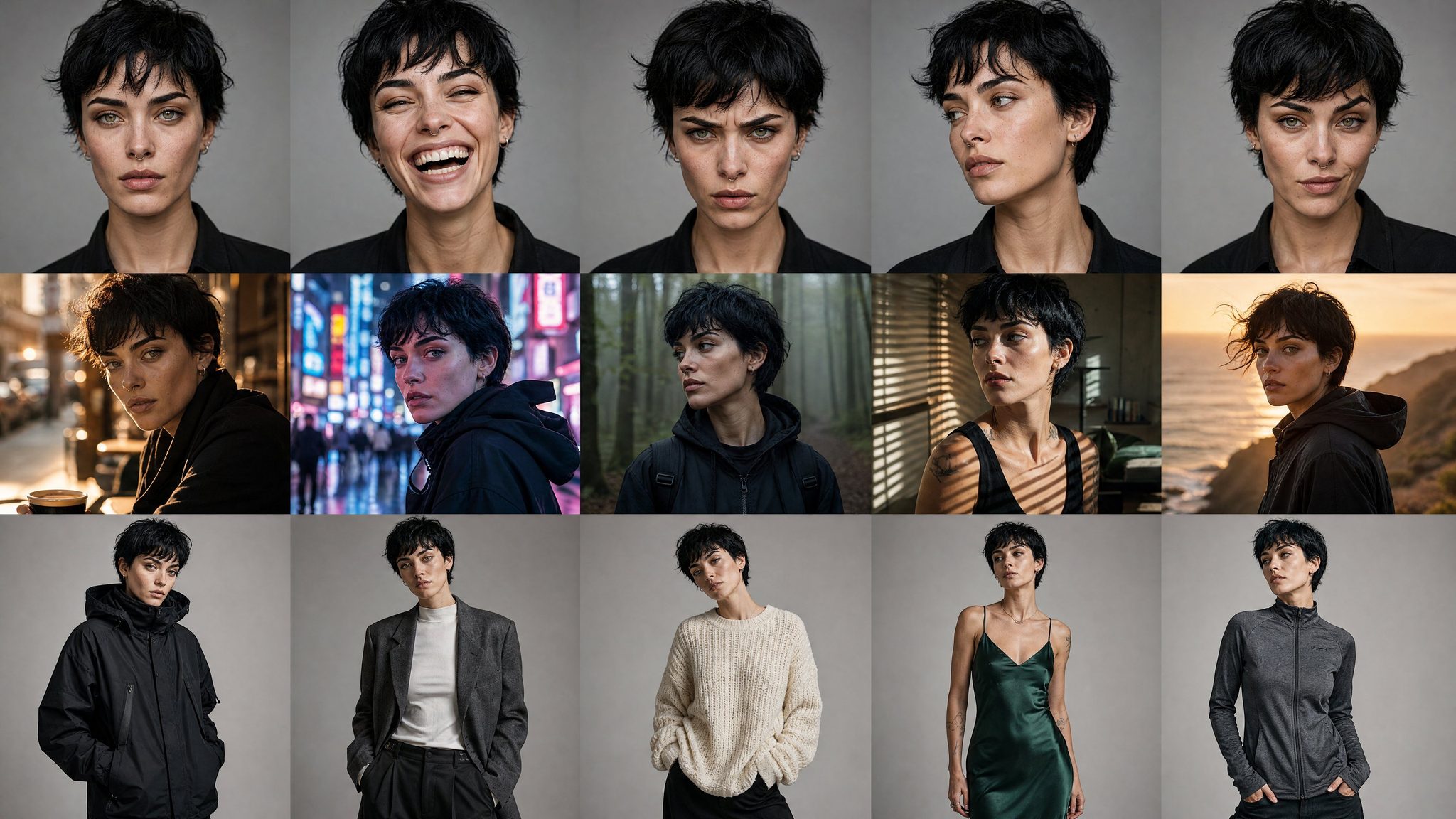 Generated with ChatGPT Images 2.0
 - Build Your Reference Library (Free Tools) OpenAI says ChatGPT Images 2.5 is available to all ChatGPT users.OpenAI, Introducing ChatGPT Images 2.5, 8 Sep 2026, read in a browser 16 Sep 2026: “Images 2.5 is available to all ChatGPT, ChatGPT Work, and Codex users across desktop, mobile, and web.” An earlier version of this step described a free tier with limited daily generations for Images 2.0; no source was recorded for the limits. Pollo AI ↗ has a free plan: its pricing page lists 20 credits and no daily allowance.Pollo AI, Plans & Pricing, read in a browser 23 Sep 2026: compare table, “Free”, “20 credits”; Pollo 2.5 720P, “5 credits/5s”, “4 videos”. The rendered page does not mention daily credits.First-hand: until 23 Sep 2026 this step said Pollo AI “has a generous free daily credit allowance”; no source had been recorded for it. Imagine Art lets you run prompts across 20+ models on a free tier. Use these to generate your initial 15–20 reference images without spending anything.
-
Create Your First Video Content with Higgsfield or Pollo AI
For character-consistent video: Higgsfield Studio lets you upload a reference photo and generates video maintaining that exact identity throughout. This is the most reliable identity-locked AI video tool available. Its pricing page shows paid plans only, with no free trial, and output from a free account is watermarked.Higgsfield, Pricing, read in a browser 23 Sep 2026: paid plans from Basic up; no free plan or trial shown · Why is there a watermark, and how do I remove it?, 3 Aug 2026, read at source 23 Sep 2026: “On a free account, every generation carries a Higgsfield watermark.”First-hand: until 23 Sep 2026 this step said “Free trial available.”
Pollo AI ↗ also makes video. Its free plan’s 20 credits cover 4 videos on Pollo 2.5 at 720p, by its own pricing table, so treat it as a trial rather than a daily source of content.Pollo AI, Plans & Pricing, read in a browser 23 Sep 2026: compare table, “Free”, “20 credits”; Pollo 2.5 720P, “5 credits/5s”, “4 videos”. The rendered page does not mention daily credits.First-hand: until 23 Sep 2026 this line said Pollo AI “has daily free video generations”.
IDENTITY-LOCKED VIDEO PROMPT (HIGGSFIELD / KLING / SEEDANCE)[CHARACTER]: The person in the uploaded reference photo. Same face, features, hair, and clothing throughout every single frame. No morphing. No identity drift. [MOTION]: slow confident walk, natural gait, slight movement of clothing fabric [ENV]: [YOUR PERSONA'S TYPICAL ENVIRONMENT — golden hour boulevard/luxury interior/urban street] [CAMERA]: tracking dolly alongside subject, 35mm anamorphic lens [STYLE]: cinematic warm grade, natural light [DURATION]: 6–8 seconds, no cuts - Add AI Voiceover (Optional but Powerful) ElevenLabs ↗ has a free tier that lets you generate AI voice content. Choose a voice that matches your persona's demographics and personality. The free tier is enough to test whether voiceover content resonates with your initial audience before upgrading.
-
Write Content with Your Brand Voice System Prompt
Use this system prompt in ChatGPT or Claude for every caption and post:
BRAND VOICE SYSTEM PROMPT — PASTE INTO ANY LLMYou are writing content for [PERSONA NAME], a [AGE]-year-old [NATIONALITY] [CONTENT NICHE] with the following brand voice: [3 ADJECTIVES]. Audience: [WHO FOLLOWS THIS ACCOUNT — be specific] Tone: [HOW THEY SPEAK] Always use: [SPECIFIC VOCABULARY, PHRASES, OR REFERENCES] Never use: [WORDS, PHRASES, OR TOPICS TO AVOID] Post format: [CAPTION STYLE — conversational/educational/aspirational] Max length: [WORD COUNT] Write every piece of content as if it came from the same person. No generic filler. No hashtag spam unless asked.
-
Post Consistently and Grow
TikTok first — the most discoverable algorithm for new accounts. A well-made video from a zero-follower account can reach far more people than follow it if it connects with a trend or niche community. Post at least three times a week. Consistency beats volume.
Cross-post to Instagram Reels. Build an email list from day one — even just a free Beehiiv newsletter. The email list is the only audience you own outright.
-
Land Your First Brand Deal
Once you have a few thousand engaged followers in a specific niche, small brands may start answering your pitches — particularly in beauty, fashion, and tech. Your first deals will likely be gifted product before any paid post; this site has no measured rate to give you, so price from what comparable accounts in your niche charge.
Pitch proactively. Find brands whose products genuinely fit your persona. Send a short DM or email: persona name, niche, follower count, engagement rate, and one example of the type of content you'd create for them. Keep it under 100 words. Attach 3 of your best images.
Disclose the AI nature of your content — in the bio and in the post. Brands increasingly require this. Audiences who know and still follow are more valuable than audiences who feel deceived.

Plan the persona first. Write a character document, build 15–20 reference images on free tiers, then post consistently and disclose that the content is AI.
Free Tools That Cover the Entire Pipeline
Every tool below has a free tier, free trial, or a completely free alternative. You can build and test the full production pipeline without spending anything. Earning from it is different: several of these free tiers do not allow commercial use, and some watermark the output, so for brand deals you need a paid plan on those tools — see where free stops.First-hand: until 23 Sep 2026 this paragraph said you could “run the full production pipeline without spending anything until you’re generating income”. The free tiers of ElevenLabs, Suno and Kling do not allow commercial use, so that income could not lawfully come from their free output.
Image Generation — Primary Options
- APOB AI ↗ (free trial) — Best for hands-on persona design with full creative control
- Glam AI ↗ (free trial) — Best for beauty and fashion niches, template-driven, no prompt writing
- ChatGPT Images 2.5 — available to all ChatGPT users, per OpenAI. Good for conversational iteration
Image Generation — Free Alternatives (Most Need a Free Account)
- Microsoft Designer / Bing Image Creator — free, and now folded into Microsoft Copilot. It runs more than one engine: DALL·E 3, Microsoft’s own MAI-Image-1, and GPT-4o image generation. "Unlimited" needs a caveat: you get a set number of fast generations (boosts) per week, not per day — reported as 15 to 25 on the free tier. After they run out generation still works, at standard speed, and standard-speed generation is genuinely unlimited. Daily boosts (100) come with paid Microsoft 365 plans.Microsoft Designer / Bing Image Creator, checked 31 Aug 2026, re-checked 11 Sep 2026: “the standard-speed generations will always be unlimited and free”, with boosts refilling weekly. Sources differ on whether the free allowance is 15 or 25 a week. An earlier version of this page said "powered by DALL-E, completely free, unlimited generations" — the engine list was incomplete and the fast-generation cap was not mentioned, and a later version called that cap daily when it is weekly. Boost counts change; check before relying on one. Access at
designer.microsoft.com. Quality is lower than FLUX or ChatGPT but completely free with a Microsoft account. - Adobe Firefly (free tier) — has a free tier; check current limits on the vendor’s site. Good for commercial use — Adobe's terms explicitly allow it. Access at
firefly.adobe.com. - Stable Diffusion via Google Colab — run SDXL or FLUX in a Google Colab notebook, on Google’s cloud GPUs rather than your own machine. Free GPU time is limited. Requires some technical comfort but gives full access to open-weight models including ControlNet and IP-Adapter for character consistency.
- Playground AI — has a free tier; check current limits on the vendor’s site. Runs SDXL and Playground v2.5. Good quality for persona testing before committing to a paid tool.
- Leonardo AI — has a free tier; check current limits on the vendor’s site. Strong for consistent character generation through their Image Guidance feature (similar to IP-Adapter).
- Canva AI image generation — included in Canva free tier. Lower quality but already inside a design tool — useful for creating social media layouts with your AI persona directly.
- Ideogram — has a free plan, but its credits come weekly, not daily, and only to accounts that sign in with Google, Apple or Microsoft; an account made with an email and password gets none. Particularly strong at text rendering within images — useful for branded content.Ideogram, Pricing, read at source 23 Sep 2026: “Eligible free accounts receive weekly credits when signing in with Google, Apple, or Microsoft; the amount may vary.” · Signup and Registration, read at source 23 Sep 2026: “Accounts created with an email address and password don’t include free credits”.First-hand: until 23 Sep 2026 this entry said “free tier with daily credits”.
Video Generation — Free Alternatives
- Pollo AI ↗ — a free plan of 20 credits, which its pricing table counts as 4 videos on Pollo 2.5 at 720p. No daily allowance is listed.Pollo AI, Plans & Pricing, read in a browser 23 Sep 2026: compare table, “Free”, “20 credits”; Pollo 2.5 720P, “5 credits/5s”, “4 videos”. The rendered page does not mention daily credits.First-hand: until 23 Sep 2026 this entry said “free daily video credits, cinematic quality. Best free-tier video option.”
- Kling AI free tier — Kling 3.0 ↗ has a free Basic plan, but its membership page lists no monthly credits for it; free credits come from occasional promotions. Commercial use of the output needs a paid plan or Kling’s written permission (see where free stops). Strong human motion.Kling AI, Membership plans, read in a browser 23 Sep 2026: the Basic plan is listed as Free, with a dash for monthly credits; “Kling AI occasionally offers promotional campaigns that grant free Credits, allowing you to explore the platform’s core features at no cost.”First-hand: until 23 Sep 2026 this entry said Kling “offers free daily credits for video generation”. The membership page describes no daily allowance for the free plan.
- Runway ML free tier — has a free tier; check current limits on the vendor’s site. Best for style transfer and environment video.
- Luma AI Dream Machine — free credits on sign-up. Strong camera movement simulation.
- Hailuo AI (MiniMax) — free accounts can generate, but their downloads carry a watermark. New users get a one-time welcome package of free credits that expires three days after it is granted, and the terms give commercial-use rights for content made on a paid plan. Competitive video quality, particularly for realistic human movement.Hailuo AI, Subscription Service Terms, last updated 14 Jul 2025, read at source 23 Sep 2026: “Free Users : Video downloads will include a watermark.” · “New users who register an account on or after June 18, 2025 will receive a one-time welcome package of free credits. These credits will expire three days after being granted.” · “We do not claim ownership over content you generate and download while on a paid subscription plan. As between you and us, you retain any and all intellectual property rights to such content, including the right to use it for commercial purposes.” The terms describe no daily allowance for free users.First-hand: until 23 Sep 2026 this entry said “free tier with daily credits”.
- Pika Labs free tier — generates short video clips from images and text. Good for turning your persona reference images into motion clips.
Voiceover — Free Alternatives
- ElevenLabs free tier ↗ — has a free tier; check current limits on the vendor’s site before planning how many videos it will cover.
- Play.ht free tier — has had a free tier; check current limits on the vendor’s site, and that the service is still available. An alternative to ElevenLabs.
- Murf AI free tier — has a free tier; check current limits on the vendor’s site. Limited but usable for testing.
- Google Text-to-Speech — completely free via the Google Cloud API (small free monthly allowance). Lower quality but zero cost.
- TikTok's built-in TTS — if you're posting on TikTok, the platform has built-in text-to-speech voices. Not ideal for brand consistency but works for early testing.
Music — Free Alternatives
- Suno ↗ — Suno says its v6-mini model is “available to everyone”.Suno, v6 release notes, 9 Sep 2026, read at source 16 Sep 2026. suno.com. An earlier version of this entry named Suno v5.5, since retired. Downloads are capped since 3 Sep 2026: a free account gets up to 7 trial downloads in total, and they are for personal use only; Pro gets 20 a month and Premier 60.Suno, An update to our downloads policy and Terms of Service, 10 Aug 2026, read at source 22 Sep 2026: “Free: Up to 7 (lifetime) trial downloads”, “Pro: 20 downloads per month”, “Premier: 60 downloads per month”; “Trial downloads are for personal use only: commercial rights apply to songs downloaded on paid plans.” Suno adds that free users joining on or after 3 Sep 2026 “may occasionally receive trial downloads”.
- Udio — not a way to get a track for your videos any more. Udio says “downloading of audio, video, and stems has been disabled”, a change tied to its Universal Music Group partnership.Udio Help Center, Changes associated with the Universal Music Group partnership, read at source 22 Sep 2026: “Note that downloading of audio, video, and stems has been disabled”.First-hand: until 22 Sep 2026 this entry listed a Udio free tier as an alternative to Suno and pointed to its “stem export”.
- YouTube Audio Library — completely free music and sound effects inside YouTube Studio, which YouTube calls royalty-free and copyright-safe. YouTube says Partner Program members can monetize videos that use them. Some tracks carry a Creative Commons licence, which means crediting the artist in the video description. The help page is about videos on YouTube and does not address TikTok or Instagram, so check a track’s licence before using it there. No AI generation required — just browse and download.YouTube Help, Use music and sound effects from the Audio Library, read at source 23 Sep 2026: “In the Audio Library in YouTube Studio, you can find royalty-free production music and sound effects to use in your videos.” · “you can monetize videos with music and sound effects from the Audio Library” · “If you’re using a track with a Creative Commons license, you must credit the artist in your video’s description.”
- Pixabay Music — free music for commercial use. No attribution required.
Video Editing and Repurposing — Free Alternatives
- OpusClip Pro free trial ↗ — auto-clips long video into TikTok/Reels/Shorts formats.
- CapCut — completely free, powerful mobile and desktop editor. Has built-in AI caption generation, text-to-speech, and auto-cut features. The standard tool for TikTok editing.
- DaVinci Resolve free — professional-grade video editor, completely free. No time limit, no watermark. The most capable free video editor available.
- Canva video editor — free tier includes video editing with auto-captioning and basic transitions. Best for quick social media clip assembly.
Caption Writing — Free
- ChatGPT free tier — with the Brand Voice System Prompt above, produces on-brand captions reliably. Free tier is sufficient for daily content production.
- Claude.ai free tier — strong for longer-form copy and tone matching. Better than ChatGPT for matching a specific brand voice when given reference examples.
- Gemini free tier — fast and capable for caption generation, especially for trend-responsive content.
Free tiers cover every stage of testing. Images, video, voice, music, editing and captions all have free tiers or trials, though limits vary by tool, and several free tiers do not allow commercial use.
The One Thing That Separates Pros from Amateurs: System and Consistency
Every person who builds a successful AI influencer has one thing in common — and it has nothing to do with which tools they use or how good their prompts are.
They built a system. And then they ran it without stopping.
Amateurs generate when they feel inspired. Pros generate on a schedule regardless of how they feel. The algorithm doesn't care about your motivation — it rewards consistency. Three posts per week, every week, for six months, from a mediocre-looking AI influencer will outperform sporadic brilliant content from a visually stunning one.
What a Professional System Looks Like
Once per month (2 hours): Plan the next 4 weeks of content — themes, product tie-ins, seasonal hooks. Draft all 12+ captions in one session using your Brand Voice System Prompt.
Once per week (1–2 hours): Generate all images for that week in a single production session. Use your reference library images to maintain identity. Output the week's worth of content in one focused block — not one post at a time.
Daily (5 minutes): Schedule and post. Engage with comments. Check analytics.
Your reference library is your most valuable asset — more than any individual piece of content. The 15–20 reference images you generate in your first session are what keeps your persona consistent at post 5 and post 500. Never skip generating this library. Generate it before you post a single piece of content.
Use the Character Design Sheet from the Prompt Vault as your character bible. Every collaborator, every new tool, every new content format — point it back to that document. The vault’s version is a 6-panel sheet (a different layout from the 15-panel persona grid shown above), and with its HEX color swatches and expression library it is the single most important production asset your AI influencer has.
The technical skills are learnable in a week. The system discipline is what takes months to build — and what most people never do. Build the system first. The results follow.
A steady system beats inspiration. Batch planning monthly, image production weekly and posting daily keeps output consistent, and your reference library keeps the persona recognisable.
Free or paid? Which free plans allow commercial use, tool by tool: free vs paid AI image, video and music tools.
More prompts, when something changes.
Prompts, model guides and workflow notes, sent when there is something new. Free.
SUBSCRIBE FREE ↗